The Failure Flywheel: Turning Real-World Disengagements into Solved Problems
In the race for safe autonomy, not all data is created equal. A thousand miles of uneventful highway driving is statistically insignificant compared to the five seconds before a disengagement.
Leading autonomy pioneers, like Waymo, have described their development loops as “flywheels”. Systems where driving leads to discovery, discovery leads to simulation, and simulation leads to safer deployment.
At Parallel Domain, we believe the Failure Flywheel, is one of the most important data flywheels autonomous programs need to be successful. It is a process where real-world disengagements aren’t just logged and labeled, they are reconstructed, varied, and programmatically solved to ensure they never happen again. And it only works if every stage of the loop is robust enough to run in production, day after day, without a team of simulation engineers holding it together. Here is how Parallel Domain turns your worst miles into your strongest assets.
Step 1: The Disengagement
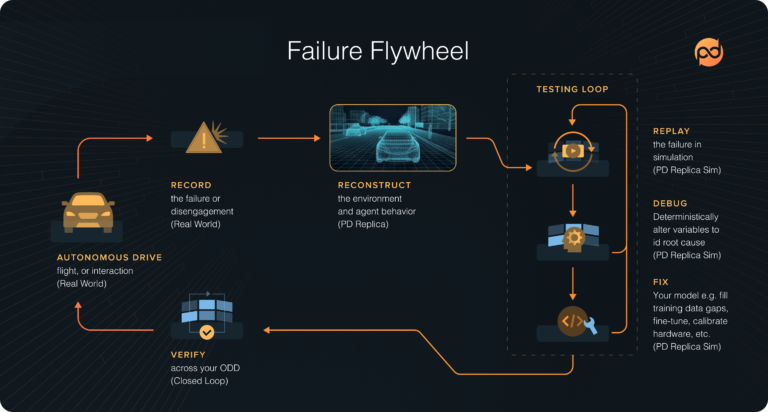
The flywheel begins when things go wrong. Perhaps your perception stack fails to classify a pedestrian stepping off a curb because they are obscured by a shadow. In a traditional workflow, this is a crisis. In the Failure Flywheel, this is the “Discovery” moment.
Instead of just labeling the frames and adding them to a training set (hoping the model “learns” the shadow), we move to scene reconstruction.
Step 2: Reconstruction
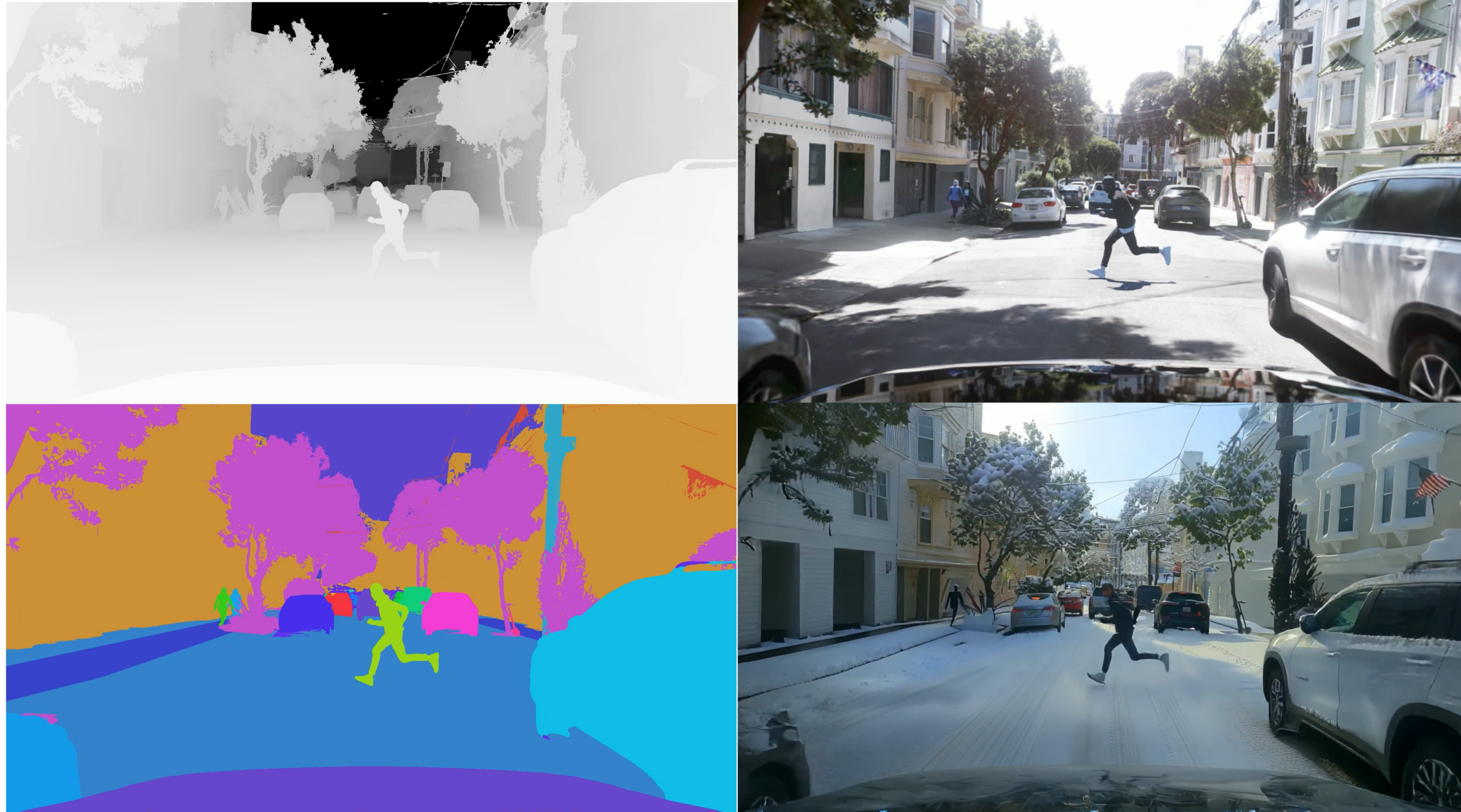
Using PD Replica, we take the drive log camera data (optionally lidar and trajectory data), and reconstruct the scene. This isn’t a 2D video replay, it is a pixel-accurate, 4D simulation environment. We clone the geometry, the lighting conditions, the dynamic agents, and trajectories leading to the failure.
Now, you don’t just have a recording of the mistake. You have a simulated laboratory containing the mistake.
Step 3: Debugging in 4D (A “Parameter Sweep”)
This is where the flywheel gains momentum. Fixing the specific failure is easy. Ensuring the system is robust against similar failures is hard.
If your car failed on a child in a red shirt, you need to know: Did it fail because of the shirt color? The height? The lighting?
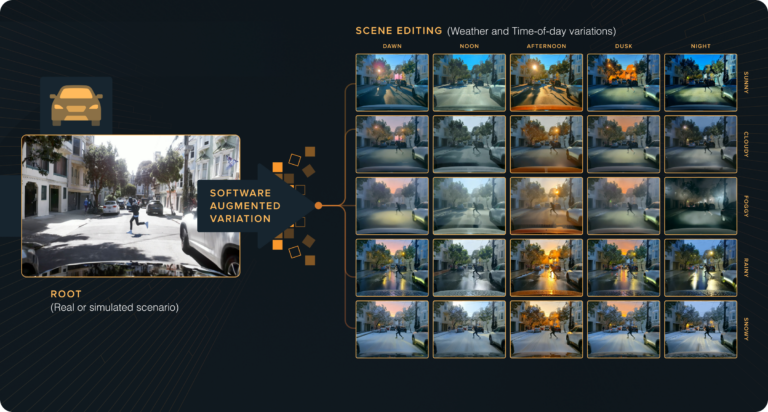
With PD Sim, you generate a “parameter sweep.” You take that single reconstructed scene and programmatically spawn thousands of variations:
- Agent Swap: Change the pedestrian to a cyclist, a construction worker, or a person in dark clothing. Open a car door, turn on an indicator, change clothing and colors. You have code control down to the pose of every object in the scene.
- Environmental Stress: Shift the time of day, and control the weather by reprocessing a Replica while maintaining consistent geometry.
- Sensor Stress: Swap lens models, distortion, lidar scan patterns, and radar configurations in code, or add sensor noise procedurally. Camera, lidar, and radar are simulated together in one rig, so you test the stack the way it actually perceives.
- Timing: Have the agent step out 0.5 seconds earlier or later.
- Context: Fill the surrounding world with traffic, pedestrians, cyclists, parked vehicles, signs, and props in a single generator call, or map the failure onto pre-built NCAP scenario templates to check it against a standardized battery.
You are no longer debugging a single log; you are debugging the behavioral logic of your stack against the infinite complexity of the real world.
And you can debug it both ways. Run open-loop to generate labeled datasets across the entire sweep, or run closed-loop, stepping the world forward frame by frame with your planner in control. If you already have a simulator, PD’s co-simulation SDK runs it in lockstep with PD Sim, so you keep what you’ve built and add what you’re missing.
Step 4: Verification & Deployment
Once your updated software stack can navigate the original failure and the thousands of generated variations, you have achieved something rare: Deterministic Confidence.
You aren’t sending the vehicle back out to “hope” it handles the next pedestrian better. You have shown, across a wide distribution of scenarios, that the specific vulnerability has been patched.
Because the flywheel runs on hosted, managed infrastructure, the fix ships without anyone standing up compute or maintaining simulation software. Generated datasets carry 20+ annotation types (2D/3D bounding boxes, segmentation, depth, optical flow, and more), land in managed storage, and decode into a common object model alongside your existing KITTI, Cityscapes, or nuImages data. Every turn of the flywheel adds to the regression suite the next turn runs against.
Conclusion: Don’t Just Drive… Solve
The path to deployment isn’t linear, it’s circular. Utilizing recordings from failures, to debug, fix, and validate model performance in simulation changes the economics of safety. It turns expensive, dangerous real-world miles into scalable, safe simulation miles.
A flywheel is only as strong as its weakest spoke. Reconstruction, variation, sensor simulation, dataset generation, and infrastructure all have to hold up under production load, or the loop stalls the first time it matters. PD Replica and PD Sim have been through thousands of iterations to make sure they don’t.
Every disengagement is an invitation to make your system smarter. With PD Replica and PD Sim, you have the tools to accept that invitation, turning today’s failure into tomorrow’s guarantee.